From code host to your first baseline
Connect GitHub, GitLab, Bitbucket or Azure DevOps read-only, add a repository, and read your first baseline CAI: what each step grants, what the first report contains, and what to look at first.
Connect a repository read-only, run the first survey, and read the Code Assurance Index it comes back with. This guide walks the GitHub App route in detail; §1 says what the other three hosts do instead.
Who this is for: the engineer or engineering lead connecting a codebase to Assert for the first time. It covers what the first survey costs and what it commits you to, what the analysis looks at, how to read the result, and which report to open first.
Assert reads your code and never writes to it: no pull requests, no commits, no branches. You connect a repository, and the first survey starts automatically. Here is that path, and what to do with the report that comes back.
1. Connect your code host, read-only
Start at assert.canine.dev. Four hosts are supported, and each grants read access a slightly different way:
- GitHub. Install the Assert GitHub App. It has read access only: enough to list the repositories your installation can reach and to clone them for analysis.
- GitLab and Bitbucket. Authorise Assert. We hold a read-scoped access token that reaches exactly what your own account reaches.
- Azure DevOps. Paste a Personal Access Token scoped to one organisation, needing only Code (read). We check it can list repositories before saving it, so a token that will not work is refused there and then.
In every case the clone uses a short-lived credential that is stripped from the checkout afterwards. There is no write path: Assert comments on none of your pull requests and changes none of your settings.
On GitHub, when you are asked to choose repositories, you can grant the App access to a single repository or a wider selection, and narrow or widen it later. On the other three, what Assert can see is whatever the token you authorised can see, so scope the token, not us.
If you would rather connect nothing at all, you can add a public repository on any of the four hosts by its URL, cloned anonymously, with no token and no installation. Connecting means you pick from a real list instead of typing an address, and it is the only way to reach a private repository.
2. Track a repository - and know what that starts
Choose a repository and track it. A good first choice is one you know well, because you can compare the report with your existing understanding of the code.
Tracking starts two things.
The first is the baseline. You do not need to start a separate scan: tracking queues the first survey immediately, and that survey is free.
The second is a recurring schedule. If the repository belongs to a team, it is surveyed at the end of each of that team's sprints; a repository with no team of its own sits on a default 14-day calendar. Those later surveys count toward your plan's monthly line-scan allowance. Only the baseline is free on every plan.
The accurate commercial summary is therefore: the first report costs nothing and requires no card, while tracking also activates a recurring cadence that uses your plan's allowance and that you can pause. If the baseline is all you want, open the repository's Settings tab and pause analyses after the report lands. What the survey measures is also what determines which plan the surveys that follow fit in. See the current terms on the pricing page.
The free baseline is granted once per repository identity. It is keyed to the repository's permanent identity at the provider, not to your account, so untracking and re-adding it does not create another free baseline. If you choose a public repository that somebody else has already tracked, its free report may already have been used. One of your own repositories is therefore the safest first choice.
3. What the survey looks at
The survey clones your code read-only, runs the analysis and produces a report. It is not a reduced version of a paid survey: depth is never gated. The baseline computes the full index across every lens and dimension that applies to the repository, exactly as a paid survey does. A plan buys breadth and cadence, not depth.
Three things govern how much of the model can be measured on your code:
- Languages. The catalogue currently holds 17 languages: 16 analysed deeply and JavaScript analysed structurally. It is a live production record and may change, so read the current one at assert.canine.dev/api/public/language-support. That endpoint is the source of truth and this line is a snapshot of it.
- Dimensions and lenses. The published rubric contains entries across ten lenses. Some are citable dimensions, identified as D1 upwards, which are the codes a finding cites; the rest are meta-dimensions that contribute to a lens without being cited directly on a finding. Most are measured by deterministic tools, and a minority carry an advisory language-model read. Each survey records the rubric version it used, and the authoritative catalogue for that run is at codeassuranceindex.info/api/rubrics/<rubric-version>/catalog; the current one is browsable at codeassuranceindex.info/dimensions.
- Applicability. Not every dimension applies to every repository, and the survey scores the ones that do. A dimension that cannot be measured reports not measured with the reason attached rather than a zero it did not earn. The report also states how many applicable dimensions returned a result.
Time to first report. Surveys run asynchronously, and expect minutes rather than seconds - longer on a large or complex codebase, and longer again at a busy moment, because a survey is served from a queue. You can close the tab while the survey runs and return to the repository page when the report is ready.
4. Read your Code Assurance Index
The survey returns a Code Assurance Index (CAI): a single 0-100 headline showing how the repository performs against the CAI rubric for software build quality. It maps onto five bands at fixed cutlines of 90 / 70 / 50 / 25:
- Exemplary, 90 to 100
- Strong, 70 to 89
- Adequate, 50 to 69
- Weak, 25 to 49
- Critical, 0 to 24
The headline is where you start; the per-lens breakdown underneath it shows where to investigate.
The ten lenses, and which apply to you
Five are always on: Code Health, Architecture, Maturity, Readiness, and Security & Compliance. Every codebase is scored on all five.
Five are conditional: Domain Modelling, Event-Driven, Event Sourcing, Accessibility, and Performance. These contribute only when they apply, and the weights re-normalise so a repository is not penalised for an inapplicable lens.
Two mechanics are worth knowing before you read your own number:
- A critical lens caps the headline. The roll-up cannot read Strong while a lens reads Critical, so one serious failure cannot be averaged away by strong scores elsewhere.
- An advisory language-model read cannot move the number. Where one is present, it can help explain a result, but it does not contribute to the score.
A worked example you can open
Assert publishes a corpus of measured open-source projects that you can read without an account: the whole corpus at codeassuranceindex.info/surveys, one language at a time, and a page per project carrying its score, its band, its trend and its per-lens gauges, with a link to the full report.
Take the published survey of the Python dependency-injection library vshulcz/injex, as it stood on 4 August 2026:
77.8, Strong. Architecture 100.0 and Code Health 92.3, both Exemplary. Security and compliance 85.0 and Production readiness 82.8, both Strong. Maturity 68.5, Adequate, and the weakest lens in the report.
Check that against the band table above and it reconciles directly: 100.0 and 92.3 clear the 90 cutline, 85.0 and 82.8 sit in the 70-89 band, and 68.5 falls in 50-69.
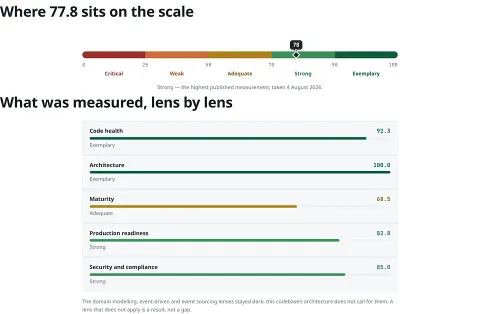
The same survey as the page renders it: 77.8 pinned on the fixed 0-100 scale, and the five lenses underneath it. The note below the lenses is the conditional-lens rule in the product's own words - three lenses stayed dark because this codebase does not call for them, and a lens that does not apply is a result rather than a gap.
Nothing is being averaged away: a well-architected library is carrying a documentation and process gap, and the number says so. That survey shows only the five always-on lenses because no conditional lens applied. Compare it with the Rust survey of jj-vcs/jj, where Domain Modelling appears as a sixth scored lens because the code has a domain model to assess. Same rubric, different applicable surface.
The practical reading is the same on your own repository: start with the weakest applicable lens rather than treating the headline as the diagnosis.
Which report to open, and what to do next
A survey produces four views of the same run. Open the Engineering report first if you are reviewing the code and deciding what to improve - it is the one written for the people who will change it. The Executive report is the summary to hand upwards, the Security report collects the security lens, and the Audit report records the run parameters and scoring scope described in the next section.
Then work in this order:
- Go to the weakest lens the report names, not the headline. On the example above that is Maturity at 68.5.
- Read the findings within that lens.
- Use each finding's dimension code to consult the catalogue for the rubric version recorded in the Audit report.
- Separate measured findings from measurement limits. A dimension marked not measured includes its reason; it is a gap in what could be assessed, not a fault in your code, and it does not count as zero.
- Choose a manageable first improvement, rather than trying to respond to the entire score at once.
Three things to hold in view
- It is a measurement, not a certification, and the report states that scope directly.
- It reads your source, history, configuration and manifests. Outside-in penetration testing and DAST are a separate and complementary exercise.
- It needs nothing else installed, and complements the engineering controls you already run rather than replacing CI, linters or scanners. Alongside its own file-and-line findings, it adds what those tools do not - architecture, change-safety, knowledge concentration and a trend across the whole product. Those history-derived signals describe the codebase and where its knowledge sits, not the people who wrote it.
5. What makes the report trustworthy
Every run records what is needed to identify it: the commit analysed, the start and finish timestamps, the rubric version, and the analyzer image. The Audit report prints those parameters, lists the lenses included in the run, states whether any lens or dimension was disabled, and carries a section on what changed since the previous scan - on a first run it says so, because there is nothing yet to compare against.
Two different checks sit behind the word "verifiable", and they are worth keeping apart:
- Repeating a survey. The same commit, under the same frozen rubric and analyzer image, is expected to produce the same number. The recorded parameters identify the conditions required for that comparison, and the method is published at codeassuranceindex.info/verify. The open reference scorer (Apache-2.0, github.com/code-assurance-initiative/CodeAssuranceIndex) recomputes the score from the evidence a survey carries. The engine that takes the measurements is not distributed, so independent end-to-end reproduction of the measurements themselves is not publicly available.
- Verifying a shared delivery. When a result is packaged and sent to somebody, that package is content-hashed and Ed25519-signed. Checking the signature against the issuer key shows where the package came from; recomputing the hash over the manifest shows whether its contents changed after signing. That check anyone can run today.
Every Assert report carries a "NOT ATTESTED" verdict rather than a pass mark. This states the scope of the report: Assert measures the repository against the CAI rubric but does not certify it against agreed acceptance criteria. Binding a report to declared criteria is an Assay capability, not part of an Assert survey.
6. Where to go next
- Pick one lens and improve it. Use the Engineering report to identify a focused first action; the next survey's Audit report will tell you what changed against this baseline.
- Decide the cadence you want. Tracking has already set one, either your team's sprint end or the default 14-day calendar. Keep it if it is useful, or pause analyses on the repository's Settings tab if the baseline was all you wanted.
- Use later surveys as comparison points. A later report gives you another measured result to compare with the baseline.
- Widen access to more repositories through the same read-only connection when appropriate.
**Survey a repository** - the first report for an eligible repository is free and requires no card. Later scheduled surveys count toward your plan's monthly allowance.
Learn more
- The product, and your free first survey: assert.canine.dev
- What surveys cost after the first: assert.canine.dev/pricing
- The measured open-source corpus: codeassuranceindex.info/surveys - each project page carries its score, trend, lens gauges and full report
- Public Assert reports: assert.canine.dev/publicreports
- Every dimension, per rubric version: codeassuranceindex.info/dimensions
- How the lenses roll into one number: codeassuranceindex.info/spec
- How a CAI is checked: codeassuranceindex.info/verify
- Languages and analysis tiers, live: assert.canine.dev/api/public/language-support
For a single survey, the exact rubric it was scored under is served at codeassuranceindex.info/api/rubrics/{rubric-version}/catalog.
- Version
- v1
- Published
- 28 October 2026
- Signed by
- Jimmy Borchsigned with a login · 28 October 2026
- sha256
- bdd2b969eae5c1ac4432587e06751d22
6db44876ccb39842c6aaf47d5affd291
Go deeper
DocumentationWhat a survey isLinks to this guideDocumentationThe journey of a surveyLinks to this guideDocumentationHow Assert worksLinks to this guide